Permissions as Code in AEM: A Practical Guide to the AC Tool
Fragments, variables, loops, and test users: how to build an AEM permission model that starts from "deny", stays readable as it grows, and stores every permission only once.
Permissions are usually the part of an AEM project that nobody wants to own. They get clicked together in the Security console on one environment, exported as a package, half-reapplied on another, and a year later nobody can say why a reviewer can delete pages in one country but not in another.
The Netcentric Access Control Tool (AC Tool) fixes the mechanics: groups, memberships and ACEs live in YAML files in Git and are applied the same way on every instance. But the tool only fixes the mechanics. A YAML file can be just as messy as a hand-made ACL. Structure is what makes the difference.
This article is the structure I keep coming back to. It covers:
- why the model starts by closing content and UI by default, then allowing;
- how to give access to a folder without the content inside it;
- fragments and how to combine them into roles;
- why fragments should be physical groups, not virtual ones, and what that costs;
- variables, loops and conditions, and file naming so global settings load first;
- test users for every role;
- keeping the AC Tool away from groups AEM creates on its own, such as DAM collections.
All examples use a fictional site called acme. They show the structure, not a ready-to-deploy configuration: always check the effective permissions on your own AEM version before rolling anything out.
The model in one picture
Before any YAML, here is the shape we are aiming for:
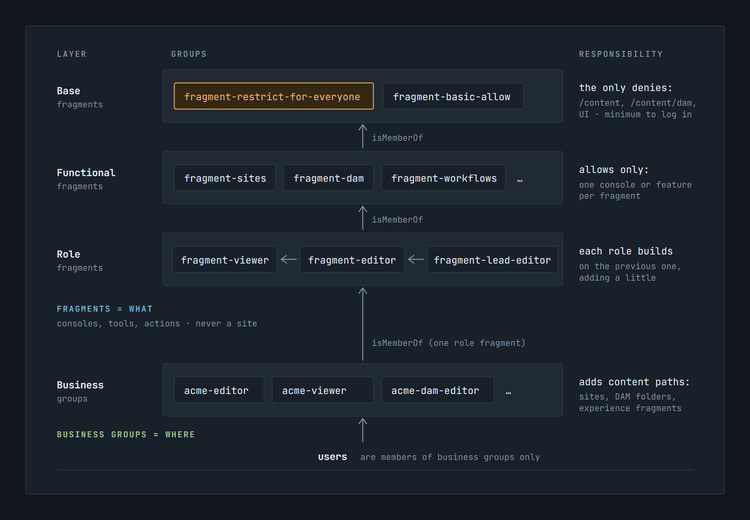
Two kinds of groups, with a clear split of responsibility:
- Fragments answer what can this kind of user do in AEM: which consoles, tools and actions they see. They never mention a site.
- Business groups answer where: which content trees, DAM folders and experience fragments. They are the only groups real users are members of.
Start from "deny", then allow
AEM is generous out of the box. Built-in groups such as everyone and contributor already grant read access to large parts of the repository and to most of the UI. You could add denies for everything a role should not do, but that list never ends: every new site, AEM release or add-on brings new paths and new consoles, and they are all open until someone remembers to close them.
The opposite approach scales better. One fragment closes the content and the UI, and every role opens only what it needs:
# global-fragments.yaml
- group_config:
    - fragment-restrict-for-everyone:
        - name: "Fragment: deny by default"
          path: acme-fragments

- ace_config:
    - fragment-restrict-for-everyone:
        - path: /
          permission: allow
          privileges: jcr:read

        - path: /content
          permission: deny
          privileges: jcr:read,jcr:readAccessControl

        - path: /content/dam
          permission: deny
          privileges: jcr:read,jcr:readAccessControl

        # Hide consoles and tools nobody gets by default
        - path: /libs/cq/core/content/nav/tools/security
          permission: deny
          privileges: jcr:read

        - path: /libs/wcm/core/content/sites/jcr:content/actions/selection/deletepage
          permission: deny
          privileges: jcr:read
The fragment does three things. It sets a known baseline (read on /, so /libs, /apps and the rest the product needs to run stay readable), closes the content trees, and hides the consoles and actions nobody gets by default. It does not lock down the whole repository, and it shouldn't: /libs and /apps must stay readable for AEM to work. "Deny by default" here means content and UI, the parts that grow with every new site and release.
Then a business group opens exactly its own content:
- ace_config:
    - acme-editor:
        - path: /content/acme/language-masters/en
          permission: allow
          privileges: jcr:read,jcr:modifyProperties,jcr:lockManagement,jcr:versionManagement,jcr:addChildNodes,jcr:nodeTypeManagement,jcr:removeChildNodes,jcr:removeNode,jcr:readAccessControl,crx:replicate
The privileges are listed one by one on purpose. Aggregates such as rep:write or jcr:all are shorter, but they hide what is actually granted, and an aggregate can include more than you expect (rep:write also brings jcr:nodeTypeManagement). An explicit list is easy to review in a pull request and easy to compare between roles: the only difference between "edit" and "edit and publish" is one word at the end of the line. The same goes for the less obvious ones: jcr:readAccessControl lets a user read the access control policies on that tree (not change them). Grant it only if your roles actually need it, and never add jcr:modifyAccessControl to an authoring role.
Why this works: in Oak, an ACE on a deeper path wins over an inherited one. The deny on /content applies to everything except the subtrees a group explicitly allows. Hiding UI works the same way: AEM consoles and toolbar actions are nodes under /libs and /apps, and a user who cannot read the node doesn't see the button. A functional fragment that needs the button again simply allows that one node.
Hiding a button is not a security control. The deny on deletepage removes the Delete action from the Sites console, but the editor group above still has jcr:removeNode on their content, and a request that doesn't go through that button will still delete the page. UI denies keep the interface clean and match it to the role. What a user can actually do is decided by the repository privileges on the content. If a role must not delete pages, don't grant jcr:removeNode and jcr:removeChildNodes on its content paths, and check that no other group grants them either.
What you get in return:
- New things are closed by default. A new site under
/contentis invisible to everyone until someone grants it. - Reviews are easy. Every
allowin a pull request is a conscious decision. A deny-list has to be reviewed for what is missing, which is much harder. - Least privilege becomes the default instead of a cleanup project.
"But Oak says: avoid deny"
It does. The Oak documentation recommends relying on its implicit deny and avoiding explicit deny entries, because mixing denies and allows across several principals quickly becomes hard to follow. That advice is right for a bare repository. AEM, however, is not a bare repository: the product itself ships with broad allows, and you cannot remove them without breaking the product.
The AC Tool documentation describes the compromise this article follows: denies are used sparingly, and normally there is exactly one group that holds all the deny entries for content that must be secured, plus many groups with allow entries that selectively open what that one group denied. So the rule is not "use lots of denies". It is: all denies in one place, coarse, at the top of the tree; everything else is an allow.
Two details make this work:
- On a single node, the AC Tool sorts deny entries above allow entries. Oak evaluates entries from the bottom of the list up, so an allow on the same node takes precedence over a deny. That is what makes the
repGlobtrick in the next section possible. - Oak evaluates entries of user principals before group principals, whatever the hierarchy. Never put ACEs on users; one user-level allow overrides any group deny.
There is also a cost to keep in mind. Oak checks permissions on query results after it reads them from the index. A user who can read only a small part of a large tree makes searches read many invisible nodes before finding visible ones. That is one more reason to align the content structure with the permission model: content with the same audience belongs in the same subtree.
A folder without its content
A recurring requirement: users must navigate through a folder to reach their own subfolder, but must not see its siblings. For example, an author of one brand needs to open /content/dam to reach /content/dam/acme, but must not see the other brands next to it.
rep:glob restrictions solve this. The AC Tool has a shortcut for them, repGlob:
        # The folder node itself
        - path: /content/dam
          permission: allow
          privileges: jcr:read,jcr:readAccessControl
          repGlob: ""

        # Its properties and jcr:content (title, thumbnails, metadata)
        - path: /content/dam
          permission: allow
          privileges: jcr:read,jcr:readAccessControl
          repGlob: /jcr:*

        # And the one subtree this group really works in
        - path: /content/dam/acme
          permission: allow
          privileges: jcr:read
repGlob: ""matches only the node atpath: no children, not even its properties.repGlob: /jcr:*matches everything whose first segment belowpathstarts withjcr:: properties such asjcr:primaryTypeandjcr:title, and the wholejcr:contentsubtree. Without it the folder shows up without a title or with a broken card in the Assets UI.- Everything else under
/content/damstays denied by the base fragment.
Put the generic part (the first two entries for /content, /content/dam, /content/cq:tags) into the deny fragment itself. Then every role can at least traverse to its own area, and business groups only add their own subtree.
One caution from the AC Tool documentation: repGlob doesn't combine well with actions. Use explicit privileges on entries that have restrictions.
Fragments: one responsibility each
A fragment is just a group that collects permissions for one purpose. Three layers work well.
Base fragments: the deny fragment above, and a small fragment-basic-allow with what every logged-in user needs (read /etc/languages, /etc without children, and so on).
Functional fragments: one console or feature each:
# functional-fragments.yaml
- group_config:
    - fragment-sites:
        - name: "Fragment: Sites console"
          path: acme-fragments
    - fragment-dam:
        - name: "Fragment: Assets console"
          path: acme-fragments
    - fragment-workflows:
        - name: "Fragment: Workflow console"
          path: acme-fragments

- ace_config:
    - fragment-sites:
        - path: /libs/cq/core/content/nav/sites
          permission: allow
          privileges: jcr:read
        - path: /libs/wcm/core/content/siteadmin
          permission: allow
          privileges: jcr:read

    - fragment-dam:
        - path: /libs/cq/core/content/nav/assets
          permission: allow
          privileges: jcr:read
        - path: /libs/wcm/core/content/damadmin
          permission: allow
          privileges: jcr:read
Role fragments: combine the others with isMemberOf and add what is specific to the role. Each role builds on the previous one:
- group_config:
    - fragment-viewer:
        - name: "Fragment: Viewer"
          isMemberOf: fragment-restrict-for-everyone,fragment-basic-allow,fragment-sites,fragment-dam,fragment-inbox
          path: acme-fragments

    - fragment-editor:
        - name: "Fragment: Editor"
          isMemberOf: fragment-viewer
          path: acme-fragments

    - fragment-lead-editor:
        - name: "Fragment: Lead editor"
          isMemberOf: fragment-editor,fragment-workflows
          path: acme-fragments

- ace_config:
    - fragment-editor:
        # Editors may copy pages, viewers may not
        - path: /libs/wcm/core/content/sites/jcr:content/actions/selection/copypage
          permission: allow
          privileges: jcr:read
Business groups then pick one role fragment and add their content paths:
- group_config:
    - acme-editor:
        - name: "ACME Editor"
          isMemberOf: fragment-editor
          path: acme
A few rules keep this maintainable:
- Prefer
isMemberOftomembers. It shows what a group inherits right where the group is defined. Usemembersonly to pull in something the configuration doesn't manage, such as groups from an external identity provider. - No content paths in fragments. If a fragment mentions
/content/acme, it is no longer reusable. - Keep fragments in their own folder (
path: acme-fragments), separate from business groups, and give them a recognisable prefix.
Physical vs. virtual fragments
The AC Tool can mark a group as virtual:
    - fragment-dam:
        - name: "Fragment: Assets console"
          virtual: true
A virtual group is never created in the repository. Its ACEs and memberships are copied into every group that lists it in isMemberOf. That looks attractive, since users don't end up with technical groups. But look at what happens to the ACLs.
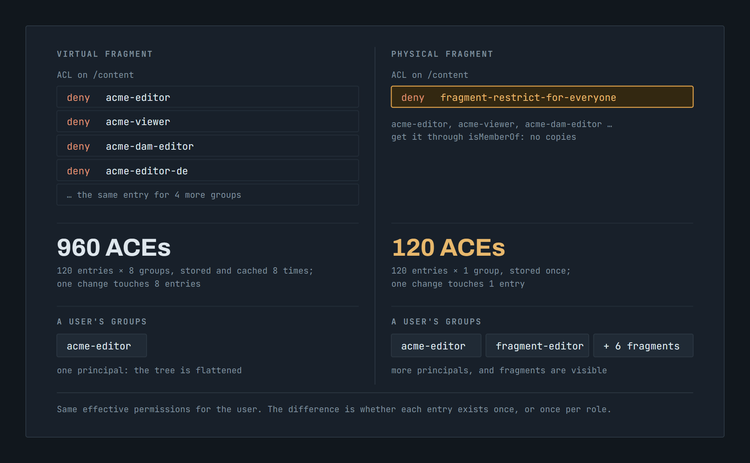
Say fragment-restrict-for-everyone has 120 entries and 8 business groups inherit it:
The AC Tool documentation says this directly: virtual groups flatten the group tree but enlarge the ACLs, because each referencing group is listed in the ACL instead of the virtual one. With nested virtual fragments (role → functional → base), the duplication multiplies at every level.
Larger ACLs are not free. Oak keeps permission entries in a permission store organised by principal and path, and caches them per principal. With virtual fragments the same 120 entries are stored and cached eight times, once for every group. Every ACL an administrator or the AC Tool reads or writes is eight times longer, and so is every diff between environments. With physical fragments each permission exists once, on one principal, and users get it through group membership.
To be fair to virtual groups: the AC Tool documentation itself calls them useful for functionality fragments, and they have one real advantage. A user ends up with fewer principals in the session, because the group tree is flattened. With physical fragments, a user who is a member of acme-editor also carries fragment-editor, fragment-viewer, fragment-sites and the rest. In practice this matters less than it sounds: Oak looks up permission entries by principal, so a session reads roughly the same number of entries either way. The difference is whether those entries exist once or once per role.
So it's a trade-off: virtual fragments buy a flatter group list with duplicated ACLs; physical fragments keep every entry once at the cost of more, visible groups. For fragments that many groups inherit, especially the base ones with most of the entries, I default to physical groups. virtual: true still fits a small fragment that only a couple of groups reference.
The downside of physical fragments
There is a cost, and it's mostly cosmetic but real: fragments are visible. A user's group list in the Security console, and in "Groups" on the user profile, shows fragment-editor, fragment-viewer, fragment-sites, fragment-dam and so on, through inherited membership. Administrators sometimes start assigning users to fragments directly, which bypasses the business groups and their content paths.
Ways to soften it:
- a separate folder (
/home/groups/acme-fragments) and a consistentfragment-prefix, so they're easy to recognise and filter out; - a clear
name/descriptionsuch as "Technical fragment, do not assign users"; - know what the AC Tool will and won't clean up: a group added to a fragment by hand is removed on the next run, but a regular user added by hand stays, because by default the AC Tool leaves user memberships alone. Users should only ever be members of business groups.
Variables
Repeated lists, such as DAM folders a role can edit or language roots, belong in a variable:
- DEF damEditable=[acme/products,acme/campaigns,acme/brand]

- ace_config:
    - acme-dam-editor:
        - FOR folder IN ${damEditable}:
            - path: /content/dam/${folder}
              permission: allow
              privileges: jcr:read,jcr:modifyProperties,jcr:lockManagement,jcr:versionManagement,jcr:addChildNodes,jcr:nodeTypeManagement,jcr:removeChildNodes,jcr:removeNode,jcr:readAccessControl,crx:replicate
A DEF is local: it's visible from the line where it is defined to the end of the same file. Values used by several files go into global_config instead:
# _global-config.yaml
- global_config:
    vars:
      - DEF acmeLanguages=[en,de,fr,es,it,pl,uk,cs]
      - DEF acmeRoot="/content/acme"
File naming: global settings first
Global variables are only visible to files processed after the file that defines them. The AC Tool reads files alphabetically by full path. So the file with global_config must sort first, which is why it's named with a leading underscore: _global-config.yaml.
A layout that reads well and sorts correctly:
acconfig/config.author/
├── _global-config.yaml         # global_config: vars, test users, unmanaged regexes
├── global-fragments.yaml       # base fragments: deny + basic allow
├── functional-fragments.yaml   # one console/feature per fragment
├── fragment-viewer.yaml        # role fragments
├── fragment-editor.yaml
├── fragment-lead-editor.yaml
├── acme-editor.yaml            # business groups, one file per group
├── acme-viewer.yaml
└── acme-dam-editor.yaml
Two details:
_sorts before lowercase letters, but after digits and uppercase letters. If anyone adds00-something.yamlorAcme.yaml, it will be processed before your globals.- The folder name carries the run mode:
config.authoris applied only on author instances. Aconfig.publishfolder can hold a much smaller configuration for publish.
Loops and conditions
FOR repeats any part of the configuration: ACEs, groups, or both.
# One group per language, each with its own language root
- group_config:
    - FOR lang IN ${acmeLanguages}:
        - acme-editor-${lang}:
            - name: "ACME Editor (${lang})"
              isMemberOf: fragment-editor
              path: acme

- ace_config:
    - FOR lang IN ${acmeLanguages}:
        - acme-editor-${lang}:
            - path: ${acmeRoot}/${lang}
              permission: allow
              privileges: jcr:read,jcr:modifyProperties,jcr:lockManagement,jcr:versionManagement,jcr:addChildNodes,jcr:nodeTypeManagement,jcr:removeChildNodes,jcr:removeNode,jcr:readAccessControl,crx:replicate
Loops can be nested. They can also iterate over the repository itself, which is useful when sites are created by authors rather than developers:
    - FOR site IN CHILDREN OF /content/acme:
        - path: ${site.path}
          permission: allow
          privileges: jcr:read
Keep in mind that CHILDREN OF reads the content of the instance it runs on. Two environments with different content end up with different ACLs, which is sometimes exactly what you want and sometimes a surprise.
IF takes an expression. The most common one checks run modes:
    - IF ${containsAnyItem(RUNMODES, ['dev','stage','prod'])}:
        - ...
Test users for every role
Checking permissions with admin proves nothing. The AC Tool can create one test user per group automatically:
# _global-config.yaml
- global_config:
    autoCreateTestUsers:
      createForGroupNamesRegEx: "acme-.*"
      prefix: "testuser-"
      name: "Test User %{group.name}"
      path: /home/users/acme-test-users
      skipForRunmodes: prod
For every group matching the regex (acme-editor, acme-viewer, ...), you get a user such as testuser-acme-editor that is a member of exactly that group.
Use them through impersonation
In practice nobody logs in as a test user. Developers and administrators impersonate them: in the AEM user menu, "Impersonate as" switches the session to the test user, and "Revert to self" switches back. No passwords to share, no second browser profile, and you can jump between roles in a few seconds. On AEM as a Cloud Service it's the natural way anyway: people sign in through Adobe IMS, and local accounts like these aren't meant for everyday login.
Impersonation is only allowed for users listed on the test user itself, and the AC Tool maintains that list for you. impersonationAllowedFor takes a YAML list of principal names (a plain string fails):
    autoCreateTestUsers:
      # ...
      impersonationAllowedFor:
        - jane.developer
        - qa-lead
What to check
A test user is a member of exactly one business group, so it shows what that group grants. A real user can be a member of several groups and gets the sum of all of them. Test the combinations that exist in reality, too.
Check what must stay closed, not only what must be open:
- the editor can edit their own site, and can't see the neighbouring sites or DAM folders;
- the viewer doesn't see Delete, and can't delete a page (the repository privilege, not just the button);
- nobody without a reason can read or change ACLs.
Things to know:
- The password defaults to the user ID. Fine on a laptop, not fine on a shared environment. Set
password(it can be encrypted with Crypto Support) or add more run modes toskipForRunmodes. skipForRunmodesdefaults toprod,production. Set it explicitly anyway, so nobody has to remember the default.
Groups AEM creates on its own: DAM collections
The AC Tool treats its configuration as the full truth. On every run it removes memberships of managed groups that the configuration doesn't declare. Usually that's what you want, but AEM creates some groups at runtime.
The typical case is DAM collections. For every collection, AEM creates its own groups following the pattern mac-default-<collection> (a parent group plus owner and editor groups). When a collection is shared, AEM adds the selected users and groups to them. If one of your managed groups was added, the next AC Tool run removes it again, and the collection is suddenly not shared any more.
Tell the AC Tool to leave those memberships alone:
# _global-config.yaml
- global_config:
    # Memberships in groups AEM creates for shared collections
    defaultUnmanagedExternalIsMemberOfRegex: mac-default-.*
The same family of settings covers other cases where something besides the AC Tool legitimately manages part of the picture:
defaultUnmanagedExternalMembersRegex: external members of managed groups to keep;defaultUnmanagedAcePathsRegex: paths where ACEs of managed groups aren't touched;- the per-group variants
unmanagedExternalIsMemberOfRegex,unmanagedExternalMembersRegexandunmanagedAcePathsRegex.
Keep these regexes narrow. The documentation itself warns that a broad one (for example, unmanaging contributor) lets hand-made permissions creep back into groups you think are managed.
Checklist
- One deny group, many allow groups. One base fragment closes
/content,/content/damand the UI. Roles open what they need. - Traverse, don't expose. Use
repGlob: ""andrepGlob: /jcr:*to open a folder without its children. - Fragments answer "what", business groups answer "where". No content paths in fragments.
- UI denies are cosmetic. Hiding a button doesn't take away the privilege; control what users can do through repository privileges on content.
- Physical fragments by default. Every permission is stored once. Accept that fragments show up in the user's groups, and name them so nobody assigns them by hand.
- Variables and loops for repeated lists. Globals live in
_global-config.yaml, which sorts first. - A test user per role, used through impersonation, never on production, never with the default password on shared environments. Test what must stay closed, not only what must be open.
- Unmanage only what AEM manages itself, like
mac-default-*for collections, with the narrowest regex that works.
The AC Tool won't design a permission model for you. But once the model has a structure, a pull request that changes who can do what is a few readable lines of YAML, and that's the point.