One Deployable, Many Repositories: Migrating a Multi-Site AEM Program to Cloud Service with Git Submodules
How we kept three independently-run product repositories — plus a shared library every team owns together — on one Cloud Manager pipeline, and why we ended up with three pipeline types instead of one.
Architecture retrospective, current as of Cloud Manager 2026.9. This describes an architecture we actually operated, not a timeless spec. Some of the Cloud Manager constraints below (§8 especially) were true when we built this and may have moved on since — check Adobe's current documentation before assuming a limitation still holds.
TL;DR
- On-prem, we ran three separate product repositories — plus a shared commons library maintained collectively — deployed separately, in sequence, to one AEM instance. A Cloud Manager deployment, by contrast, is assembled from a single pipeline repository revision — there's no "install package B onto the environment that already has package A." Repositories that must contribute to the same deployment need an explicit assembly mechanism.
- We did not merge the repos. We created an aggregator repository (we call it the reactor) that contains a root Maven
pom.xml, shared vendor packages, the Dispatcher config, the CDN config — and Git submodule pointers to each product repository. - A GitHub Action in every product repository updates the submodule pointer in the reactor and pushes. Product teams keep their own repo, their own PR flow, their own release cadence, and never touch the reactor by hand.
- In Cloud Manager we registered both the reactor repo and the product repos as private repositories. Product repos run Code Quality pipelines on pull requests; the reactor repo runs deployment pipelines.
- Because Dispatcher config and CDN config live in the reactor, we split deployment into three independent pipeline types: Full Stack (Java + content), Web Tier Config (Dispatcher), Config (CDN, maintenance tasks). A CDN rule change ships in minutes without rebuilding a line of Java.
If you are staring down an on-prem → AEMaaCS migration with more than one codebase, this is the article I wish I'd had.
1. The starting point: three repos, three deployments, one instance
Our on-prem setup was completely ordinary for a large enterprise program that grew over a decade:
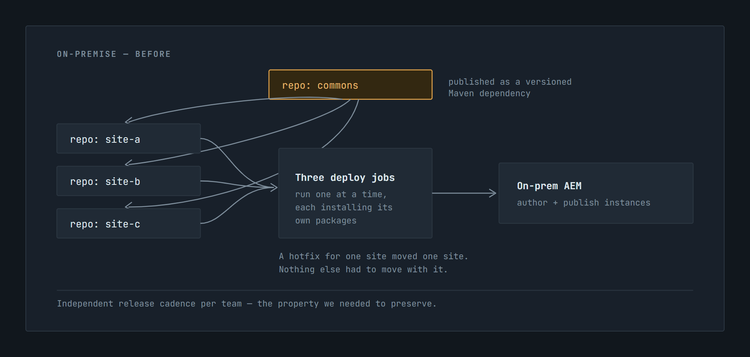
Three product repositories on GitHub, plus a fourth repo the three teams maintained together:
- site-a, site-b, site-c — three product/brand codebases, each with its own team, backlog, release train and deployment job.
- commons — not a fourth project with its own team, but a shared bundle plus shared
ui.apps/ui.configpackages (services, models, utilities, component base classes) that all three teams contributed to and all three sites consumed.
Each repo built its own content packages and each was installed onto the same author and publish instances, independently and sequentially. commons was published as a versioned Maven artifact; the sites consumed it as a dependency. If site-b needed a hotfix at 18:00, site-b deployed. Nothing else moved.
That model is simple, it scales organizationally, and AEM as a Cloud Service takes it away from you.
2. The constraint that forces the redesign
The problem isn't that AEMaaCS "requires a monorepo." It's narrower and more mechanical than that: a Cloud Manager deployment is assembled from a single pipeline repository revision. A pipeline:
- clones one Git repository and checks out one branch,
- runs one Maven build from the repository root,
- collects the resulting content packages into the images that become your environment,
- deploys them as a unit.
There is no "install package #2 onto the instance that already has package #1." The environment is rebuilt from the artifacts of a single build, at a single revision. Which means:
If several independently maintained repositories must contribute to the same deployment, they need an explicit assembly mechanism that resolves to one revision.
Three product repos plus a commons repo, all deploying to the same environment, need exactly that: a repository whose contents — or, as it turns out, whose submodule pointers — resolve to that one revision. The whole design problem is: how do you build that assembly mechanism without destroying three independent team workflows?
3. The three ways to get one repository
Option A — Merge everything into a monorepo
Physically move all code into one repo, delete the old ones.
- ✅ Simplest possible pipeline configuration.
- ❌ Destroys the per-team PR flow, branch protection, CODEOWNERS, release cadence, and issue-to-branch conventions that three teams have built over years.
- ❌ Every team's CI now runs on every other team's commits.
- ❌ A migration that was supposed to be "same code, new runtime" becomes a reorganization of how three teams' worth of people work. That is what kills migration timelines.
Option B — Adobe's documented copy-forward pattern
Adobe's own guidance describes automation (GitHub Actions or Jenkins) that copies the file tree of each source repository into a designated subdirectory of Cloud Manager's Git repository, with a branch mapping between the two.
- ✅ Works everywhere, no special Cloud Manager feature required.
- ❌ The aggregator repo's history becomes a stream of enormous "sync" commits containing every changed file. Diffing, blaming and reverting get painful.
- ❌ Deletions need care (
git add --all, notgit add). - ❌ You now have two physical copies of every file, and no cheap way to answer "exactly which commit of site-b is live in production?"
Option C — Aggregator repository with Git submodules ← what we chose
The aggregator contains no product code at all. It contains a root pom.xml, shared infrastructure, and a submodule pointer — literally one commit SHA — per product repository.
- ✅ A sync commit is one line per project. History stays readable forever.
- ✅ "Which commit of site-b is in production?" is answered by
git submodule statuson the production branch. That is an audit trail you get for free. - ✅ Product repos are untouched: same URL, same branches, same PR flow, same protections.
- ✅ Cloud Manager natively resolves submodules at build time (details in §8), so there is no file copying at all.
- ⚠️ Submodules have sharp edges. We hit most of them. §10 is the list.
4. The architecture
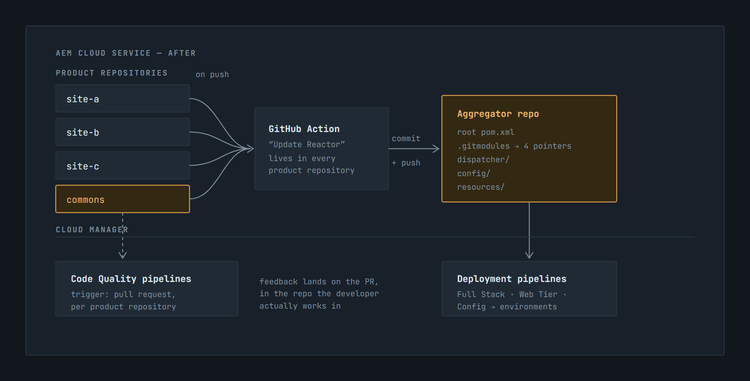
Two flows, two purposes:
- Left: a developer opens a PR in their own product repo → Cloud Manager runs a Code Quality pipeline against that repo and branch. Feedback lands on the PR, in the repo the developer actually works in. No aggregator involved.
- Right: a merge to an integration branch → the Action updates the pointer in the reactor → the reactor's deployment pipeline builds and deploys everything together.
That separation is the part most teams miss, and it is what makes the whole model livable.
5. Anatomy of the aggregator repository
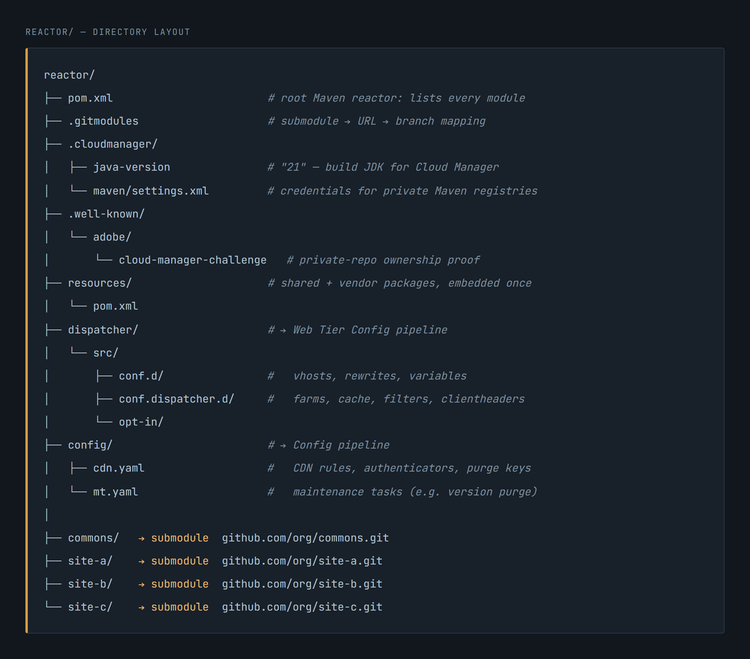
The root pom.xml
<modules>
  <module>resources</module>
  <module>commons</module>
  <module>site-a</module>
  <module>site-b</module>
  <module>site-c</module>
  <module>dispatcher</module>
</modules>
Order matters: resources and commons first, because everything else depends on them. Each submodule directory contains its own pom.xml with its own all, core, ui.apps, ui.content, ui.config modules — completely unchanged from the on-prem layout. Maven simply walks into them.
The root POM is also where we centralised:
<dependencyManagement>for every shared third-party artifact (Core Components, ACS AEM Commons, ACL tooling, Sling Dynamic Include, …) — one version, one place, no drift between sites.<repositories>pointing at our private Maven registries.- The Java/compiler level (
21), matching.cloudmanager/java-version.
The resources module
A single content-package of type container whose only job is to embed vendor packages once for the whole program:
<embedded>
  <groupId>com.adobe.acs</groupId>
  <artifactId>acs-aem-commons-bundle</artifactId>
  <target>/apps/reactor-packages/application/install</target>
</embedded>
On-prem, each site had shipped its own copy of the same vendor bundles. In one shared deployable, that means the same OSGi bundle installed three times with three possible versions — a guaranteed incident. Hoisting them into one module was one of the highest-value refactors of the whole migration, and it was only possible because we had an aggregator.
.gitmodules
[submodule "site-a"]
	path = site-a
	url = https://github.com/org/site-a.git
	branch = develop

[submodule "commons"]
	path = commons
	url = https://github.com/org/commons.git
	branch = develop
Two things to notice:
- The
branchkey is required by our synchronization model, not by Cloud Manager. It's whatgit submodule update --remotefollows when our sync job advances a pointer. It is not what determines the commit Cloud Manager actually deploys — that's the gitlink (a specific commit SHA) recorded in the aggregator commit itself, regardless of whatbranchsays. Cloud Manager's owngit submodule update --init(§8) checks out that recorded SHA and ignoresbranchentirely. - The
.gitmodulesfile differs per aggregator branch. On thedevelopbranch of the reactor, every submodule tracksdevelop. Onmain, every submodule tracksmain. That single file is the entire environment-to-branch contract for our sync job. (See §7.)
6. The sync automation
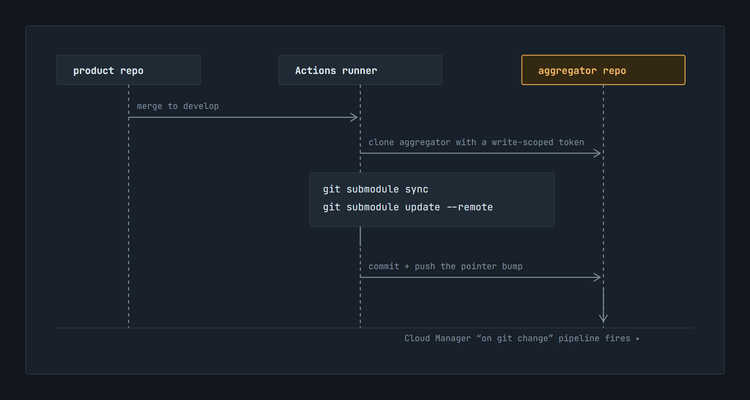
One CI workflow, committed into every product repository, does the whole job. Rather than reproduce our actual file line-for-line — it's internal automation, not something meant for public reuse verbatim — here is the mechanism it implements. It ports directly to GitHub Actions, GitLab CI or Jenkins:
TRIGGER   push to an integration branch (develop, qa, …) in a product repo

SYNC JOB
  1. Check out the current product repo — full history, not a shallow clone
  2. Check out the aggregator repo, authenticated with a write-scoped
     token (the default per-repo CI token cannot push into another repo)
  3. Switch to the matching branch in the aggregator;
     create it if it doesn't exist yet
  4. git submodule sync
  5. git submodule update --remote --recursive
       → moves every submodule pointer to the tip of the branch
         named for it in .gitmodules
  6. Commit "Update submodules to latest <branch>"
       → treat "nothing to commit" as success, not failure
  7. Push the aggregator branch
Step by step
Why each step matters
.gitmodulesgit submodule sync.gitmodules URLs to local Git config. Without it, a changed URL is silently ignored.--remotegit commit exits non-zero on an empty index. Without this guard, every idempotent run turns the job red.The --remote trade-off you must decide consciously
git submodule update --remote --recursive advances all submodules, not just the one that triggered the run. A push to site-b will also sweep in whatever landed on commons:develop an hour ago.
For an integration branch that is exactly what you want: the reactor's job is "the current state of everything." For a release branch it is dangerous, and you should either scope the update (git submodule update --remote -- site-b) or lock release branches so only deliberate, reviewed pointer bumps happen. We learned this the direct way.
7. Branch topology = environment topology
The mapping is one-to-one and lives in .gitmodules per reactor branch:
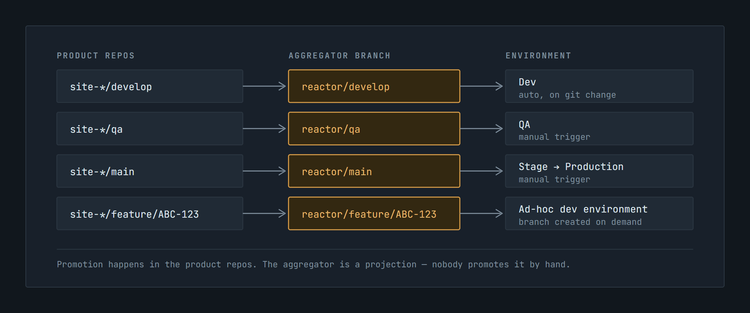
On reactor/develop, .gitmodules says branch = develop for every submodule. On reactor/main, it says branch = main. Promotion is therefore normal Git in the product repos — develop → qa → main — and the reactor follows along automatically. Nobody promotes "the reactor"; the reactor is a projection.
Integration branches are moving manifests. Release branches are immutable manifests.
This is the sharpest way to describe what the aggregator actually is: not just a repository, but a bill of materials whose submodule pointers are either moving or frozen, depending entirely on which branch you're looking at.
On develop and qa, our sync job runs git submodule update --remote --recursive on every push, so the pointers are always racing to catch up to whatever's newest in each product repo:
develop (moving manifest)
  site-a   → latest commit on site-a:develop
  site-b   → latest commit on site-b:develop
  commons  → latest commit on commons:develop
That's exactly the property an integration branch needs — "the current state of everything" — and it's exactly why the moving version needs the failure-mode handling in §10: a live, converging system can race, drift, or partially fail to converge.
A release cut wants the opposite property: the same commits that reached QA are the same commits that reach Stage and Prod, full stop.
release/2026.09 (immutable manifest)
  site-a   = a1b2c3d   ← frozen at cut time
  site-b   = 9f8e7d6
  commons  = 4c5d6e7
We get that the practical way: nothing runs --remote against a release branch. No sync job targets it — it isn't in any product repo's on: push: branches: trigger list. Pointers on a release branch move only when someone deliberately re-runs the update for one named submodule (a hotfix), which is a reviewed, single-line diff, not an automatic sweep.
git submodule status on a release branch is therefore not just diagnostic — it's the actual, auditable manifest of what shipped.
Feature branches only cover the submodules that have one
Because of git checkout X || git checkout -b X, a developer working on a spike can push feature/ABC-123 in a product repo, get a matching reactor branch created automatically, and point a dev pipeline at it. That gave us cheap, isolated, full-stack feature environments — something that was effectively impossible on-prem.
The part worth spelling out: pushing feature/ABC-123 to site-a does not automatically put every other submodule on a branch of the same name. If site-b, site-c and commons have no feature/ABC-123 branch, the fallback in .gitmodules for those submodules is whatever branch the reactor's feature/ABC-123 was branched from — typically develop. So a feature environment is really: this one submodule on the feature branch, every other submodule on baseline. That's usually exactly what you want (you're testing one change in the context of everything else at its current state) — but it does mean a feature environment is not automatically isolated across the whole stack, and if your change genuinely spans two product repos, you need matching feature branches in both, or an explicit, reviewed override of the aggregator's .gitmodules for that branch.
8. What Cloud Manager actually does with submodules
Worth stating precisely, because there is contradictory folklore online.
At build time, Cloud Manager clones the pipeline's repository, checks out the configured branch, and — if a .gitmodules file exists in the root directory — runs:
$ git submodule update --init
Note: --init, not --remote. Cloud Manager checks out exactly the commits your .gitmodules-managed pointers record. It never advances them for you. That is precisely why the sync automation in §6 exists: the pointer bump is your job; the checkout is Cloud Manager's.
The documented rules you must respect (Git Submodule Support):
.gitmodules locationhttps://git.cloudmanager.adobe.com/ProgramName/projectName/. GitHub repos: HTTPS or SSH, must be github.com.Not on GitHub.com? The version we shipped first
Before our GitHub organization was connected to Cloud Manager directly, none of the above was available to us, and we ran the harder version of this pattern.
Documented git submodule support names exactly two kinds of hosts: Adobe's own git.cloudmanager.adobe.com repositories, and GitHub.com repositories reachable through the Adobe GitHub App. Nothing else appears in that spec. So before the GitHub App was connected, our aggregator's submodules couldn't point at a product repo directly. Instead:
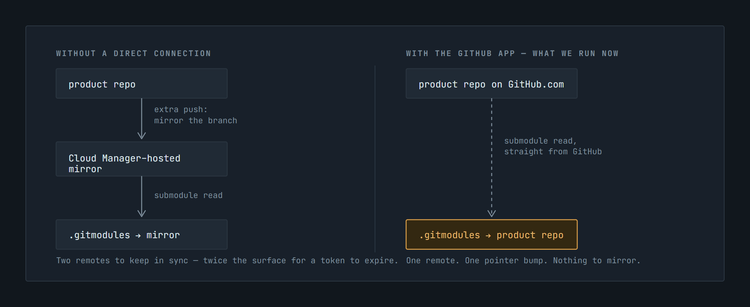
Each product repo needed its own mirror living inside Cloud Manager's own git hosting, and the aggregator's .gitmodules pointed at that mirror, not at the real repo. The sync workflow grew a second leg: push the product repo's commit to its Cloud-hosted mirror, then bump the aggregator's submodule pointer to the mirror's new commit, then push the aggregator. Two pushes, two remotes — twice the surface for a token to expire or a webhook to quietly stop firing.
Once our GitHub organization was connected directly (the Private Repository flow below), that mirror leg disappeared entirely. The aggregator's submodules could point straight at the real product repos, and the sync workflow collapsed to the single pointer-bump job in §6.
The external-repository story keeps moving, so treat this section as a snapshot, not a spec. When we first shipped this, documented submodule support covered exactly two kinds of hosts — Adobe's own repos and GitHub.com through the Adobe GitHub App — so a product repo hosted anywhere else needed the mirror-and-double-push workaround above. That was a constraint of the implementation at the time, not a permanent architectural requirement.
Separately, Cloud Manager has been actively expanding "external repositories" (Bring Your Own Git) — GitLab (cloud and self-hosted), Bitbucket Cloud, Azure DevOps and GitHub Enterprise Server, connected via a personal access token and a manually configured webhook, no GitHub App required. As of the last time we checked Adobe's live documentation (September 2026), that feature is still scoped to feeding a Full Stack or Frontend pipeline directly, is explicitly documented as unable to back a Configuration pipeline, and the dedicated submodule documentation still names only GitHub.com and Adobe's own repos as valid submodule hosts — GitLab, Bitbucket and Azure DevOps aren't in that spec. We could not find a primary source confirming that has changed, despite it being a plausible next step given how fast this area is moving.
If your product repos aren't on GitHub.com, check Adobe's current submodule and external-repository documentation directly before designing around either answer. Don't take our word, and don't take a search engine's summary of our word either — verify against the live docs, the same way we just did for this paragraph.
Registering the repositories
Add the repo in Program Overview → Repositories → Add Repository → Private Repository, install the Cloud Manager for AEM GitHub App (needs org-owner rights), then prove ownership by committing the generated secret to .well-known/adobe/cloud-manager-challenge on the default branch and clicking Validate (Add Private Repositories). The repo shows a red icon until validated. GitHub.com only — self-hosted GitHub is not supported by this flow (it goes through External Repositories instead, per the caveat above).
We registered five repositories: the reactor, the three product repos, and the shared commons repo. The reactor is what deployment pipelines build. The other four exist in Cloud Manager purely so that pull-request Code Quality pipelines can run where developers actually work.
9. Three artifact types, three pipelines — the payoff
This is the part I would put on a slide if I had one slide.
Because the Dispatcher config (dispatcher/) and the CDN/maintenance config (config/) live in the aggregator repository alongside the code, we could give each of them its own Cloud Manager pipeline. Cloud Manager distinguishes the deployed artifact by pipeline type:
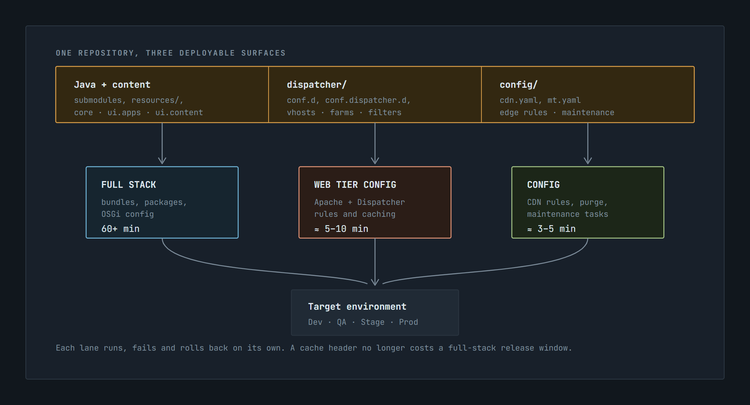
ui.apps, ui.content, ui.config, vendor packagesIn practice this gives every environment tier its own small family of pipelines — a Full Stack and a Web Tier Config pipeline per tier at minimum, a Config pipeline wherever CDN or maintenance settings need to move independently, plus one PR-triggered Code Quality pipeline per product repository. The exact count depends on how many tiers you run; the shape — three types, replicated per tier, plus per-repo quality gates — is what matters.
Why this matters more than it sounds.
A Full Stack deployment on a program this size comfortably runs over an hour — it rebuilds and redeploys everything, top to bottom. Under that model, "add one cache-header rule for one vhost" and "ship a quarter's worth of features" cost exactly the same. Teams respond rationally: they batch changes, they avoid touching the Dispatcher, and the config drifts from what anyone intended.
Splitting the pipelines changes the economics. A Dispatcher filter fix, a CDN redirect, a cache TTL adjustment — each is a small, independently reviewable, independently revertible change that ships in minutes without recompiling a single Java class or touching any site's release schedule. Mean time to recovery for edge-layer incidents dropped from "wait for the next deployment window" to "about ten minutes."
Independent pipelines are not independent changes, and it's worth saying that plainly. Splitting the deployment mechanism doesn't split the semantic dependency between layers. An application change that introduces a new URL, selector or response header can require a matching Dispatcher rule and, behind it, a matching CDN rule:
application change → new URL / selector / header
        → Dispatcher rule must follow
              → CDN rule must follow
The three pipelines let you ship each of those mechanically on its own schedule — that's the whole point — but someone still has to know the chain exists and sequence it correctly (usually: code first, then Dispatcher, then CDN, so nothing 404s in between). Splitting the pipelines buys you deployment independence, not change-coordination for free.
Two practical notes:
- The Dispatcher module enforces immutability. The Maven build fails on checksum mismatch if you edit an Adobe-owned immutable file. That is a feature — it catches the classic "I edited
default.vhostinstead of adding my own" mistake at build time rather than at 2 a.m. - Keep CDN secrets out of YAML.
cdn.yamlreferences Cloud Manager environment variables (${{CDN_EDGEKEY_1}}), not literal keys. Rotating a purge key becomes a variable update, not a commit.
10. The gotchas — everything that bit us
1. --remote sweeps everything. Covered in §6. Decide per branch class whether that is desirable, and constrain release branches.
2. Concurrent pushes race. Two product repos merging within the same minute both clone the reactor, both commit, and the slower one's push is rejected. Mitigate with GitHub Actions concurrency: groups keyed on the target branch, plus a retry with rebase. A rejected push is not just a red build — it means a pointer bump silently did not land.
3. Submodules are checked out in detached HEAD. After a local git submodule update --init, you are not on a branch. Editing code there and committing produces a commit on no branch, which the next update discards. Developers must work in the product repo clone, not inside the aggregator's submodule directory. Say this out loud in onboarding; write it in the README.
4. Everyone must run git submodule update --init. A fresh clone of the aggregator gives you empty directories and a Maven build that fails with a baffling error. Put it in the README as step one, and consider a prepare script.
5. Shared-dependency version alignment. The moment all sites land in one deployable, two sites pulling two versions of the same OSGi bundle becomes a real runtime conflict rather than a theoretical one. Centralise every shared version in the root <dependencyManagement> and forbid version declarations in submodule POMs.
6. The aggregator's history becomes machine-generated. Ours is a wall of Update submodules to latest develop. That is fine — but it means humans must never rely on the reactor's log for "what changed." The answer always lives in the product repos. git submodule summary between two reactor commits is the tool that bridges the two.
7. PAT lifecycle is a single point of failure. One expired token silently stops all synchronisation; pipelines keep deploying the last known-good pointers and nobody notices for a day. Use a GitHub App installation token if you can, alert on workflow failures, and calendar the expiry.
8. Keep .cloudmanager/java-version and the POM's compiler level in lockstep. They are read by different systems; when they disagree, the build failure message points at neither.
11. What it bought us
- Minimal change to how three teams work. Same repos, same PR flow, same branch protections, same release trains — the migration stayed mostly a runtime migration. Not entirely free: teams did pick up submodule rules, the branch-naming convention, credential handling for the sync job, and the detached-HEAD caveat in §10. That's a real, if small, list — worth naming rather than waving away.
- An explicit, auditable per-environment bill of materials.
git submodule statuson the production branch is an exact answer to "what is live right now?" — but it's not free; it's the payoff for carrying the aggregator's own complexity (§10's gotchas are the ongoing cost side of this ledger). - Independent deployment of code, web tier, and CDN, which is the single largest operational improvement we got out of the move.
- Independent local builds, too. Each product repo is still a self-contained Maven reactor on its own. A developer can build and install just their own module against a local AEM instance (
mvn -pl <module> -am clean install -PautoInstallSinglePackage) without touching the others — no need to wait on a full reactor build during day-to-day development, which matters even more once the full Cloud Manager pipeline run is over an hour. - Disposable full-stack feature environments, auto-provisioned by pushing a branch.
- One place for shared dependencies, which eliminated a whole class of duplicate-bundle incidents.
- Reversibility. Nothing about this design is one-way. If we ever want the monorepo, the submodules are already laid out in exactly the directory structure a
git subtree/filter-repomerge would produce.
12. When not to do this
Be honest about the cost: you are trading a simple repo layout for a distributed system with a synchronisation job in it. That is only worth it when the organisational split is real.
Do it when: you have multiple genuinely independent teams with independent release cadences; the repos already exist and have history worth keeping; different codebases have different compliance or access requirements.
Don't do it when: it is one team and two repos that were split for no particular reason — merge them and move on; or when the codebases are so entangled that every change spans all of them anyway, in which case the submodule pointers just add ceremony to a monorepo you already have.
13. Replication checklist
- Create the aggregator repository. Add the root
pom.xmlwith an empty<modules>section,.cloudmanager/java-version, and.cloudmanager/maven/settings.xml. - Register it in Cloud Manager as a private repository; install the Adobe GitHub App; commit
.well-known/adobe/cloud-manager-challenge; validate. - Register each product repository the same way — you will want PR Code Quality pipelines on them.
git submodule add -b <branch> <url> <dir>for each product repo, at the root only. Commit the empty directory plus.gitmodules.- Add each directory to
<modules>in the root POM, dependencies-first. - Create a
resourcescontainer package and hoist every vendor/third-party package into it. Remove those embeds from the product repos. - Move
dispatcher/andconfig/into the aggregator. - Add the sync workflow to every product repo. Configure the aggregator repo name as a CI variable and the write-scoped token as a secret. Add a
concurrency:group. - Replicate the branch set in the aggregator, with a
.gitmodulesper branch pointing at the matching product branches. - Create pipelines: Full Stack + Web Tier Config + Config per environment tier from the aggregator; Code Quality on PR from each product repo.
- Document
git submodule update --initand the detached-HEAD rule in the README before anyone else clones it.
Sources
- Use Multiple Repositories — AEM as a Cloud Service
- Git Submodule Support — Cloud Manager
- Add Private Repositories in Cloud Manager
- Add External Repositories in Cloud Manager
- Manage Repositories in Cloud Manager
If you are running a multi-repo AEM program on Cloud Service, I'd genuinely like to hear which route you took — aggregator, monorepo, or copy-forward — and what broke. The failure modes are where the real knowledge is.